Search engine optimization (SEO) and social media appearance can be finely controlled for each page and post. By defining and configuring content within the system’s framework, users can complete their own unique portal pages and content.
<title>
<meta name=”description”>
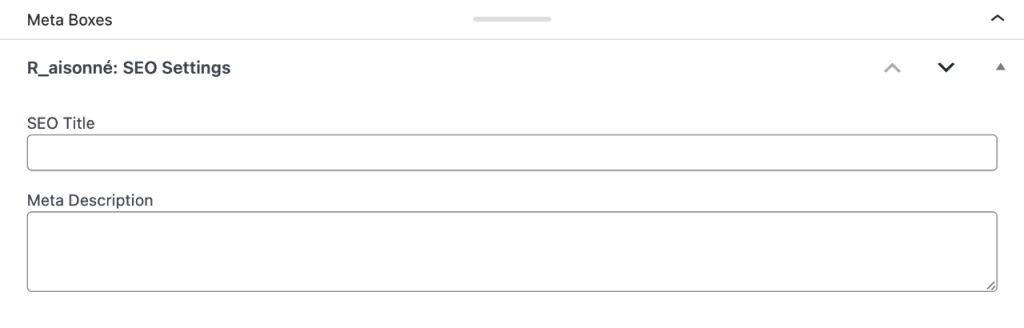
Settings can be configured via the R_AIS SEO Title and Meta Description provided in the meta box. If left blank, the following content will be automatically applied.
<title>
Post Title | Site Name
<meta name=”description”>
Content entered in Admin Dashboard > Settings > General > Tagline
<meta property=”og:image”>
The featured image of the post will be prioritized for social media sharing.
If no featured image is set: The content from Admin Dashboard > R_aisonné > DATABASE > SEO Global Settings > Default OGP Image URL will be applied. If Default OGP Image URL is also unset: The <meta property="og:image"> tag itself will not be output.
Precautions for Operating Automatically Generated Individual Pages
- Changing the slug (URL) is not recommended, as it may cause system malfunctions.
- Please retain each page without deleting them.
Works
Slug : /works
Template Applied : None (Default)
This page can be used freely as an information page for your site, such as an entry point to the Database List. Since it is blank by default, please add text or links as needed. The page title can be changed freely.
Database
Slug : /works/database
Template Applied:/plugins/r-aisonne/templates/page-database.php
This is the page where the database list is displayed.
The page title can be changed freely.
Database Detail
Slug : /works/database/detail
Template Applied:/plugins/r-aisonne/templates/page-database-detail.php
This is the page where work details are displayed.
The page title can be changed freely.
For this details page, the registered work title, content, and main image are automatically reflected in the meta tags. Since optimal information for search engines and social media sharing (OGP) is automatically assigned simply by registering a work, there is no need to set a featured image or individual SEO settings.
img
Slug : /img
Template Applied:/plugins/r-aisonne/templates/page-img.php
This is a system-exclusive template page specialized solely for displaying images. It is designed to display image files while concealing their direct file paths.
Do not delete : This is a mandatory page used to call the image delivery module (R_AIS_Image_Delivery).
No editing required : Since the program directly outputs the image and terminates the process, there is no need to add content to the page via the admin dashboard.
XML Sitemap All
Slug : /sitemap
Template Applied : /plugins/r-aisonne/templates/page-sitemap.php
This is an XML sitemap generation page designed to accurately communicate the entire site structure, including the works database, to search engines such as Google Search Console.
- Do not delete: This is a mandatory page for improving the indexing accuracy of the entire site and maintaining SEO effectiveness.
- No editing required: Since the program dynamically generates an XML file reflecting the latest database information upon access and terminates the process, there is no need to add content via the admin dashboard.
- Multilingual & Database Support: In addition to static pages, it automatically aggregates and outputs URLs for multilingual expansion via Bogo and work details registered in the plugin’s unique database.
After site launch, please register this URL with Google Search Console.
Regarding Registration with Google Search Console
This “XML Sitemap All” page serves as a map to help search engines like Google “discover” every page on your site. Please follow the steps below to submit this URL to Google.
- Log in to Google Search Console.
- Click “Sitemaps” under the “Indexing” section in the left-hand menu.
- Enter the slug
sitemapin the “Add a new sitemap” field. (Example:https://yourdomain.com/sitemap) - Click the “Submit” button to complete the process.